






Google has just rolled out one of the biggest changes to Search Console in years, and it has nothing to do with your website. For the first time, you can connect your Instagram, TikTok, X, and YouTube accounts directly to Search Console and finally see how that content performs inside Google Search and Discover.
If you have ever posted a Reel or a TikTok and wondered whether it actually drove any real search traffic beyond likes and views, this update was built for exactly that problem.
What Exactly Changed
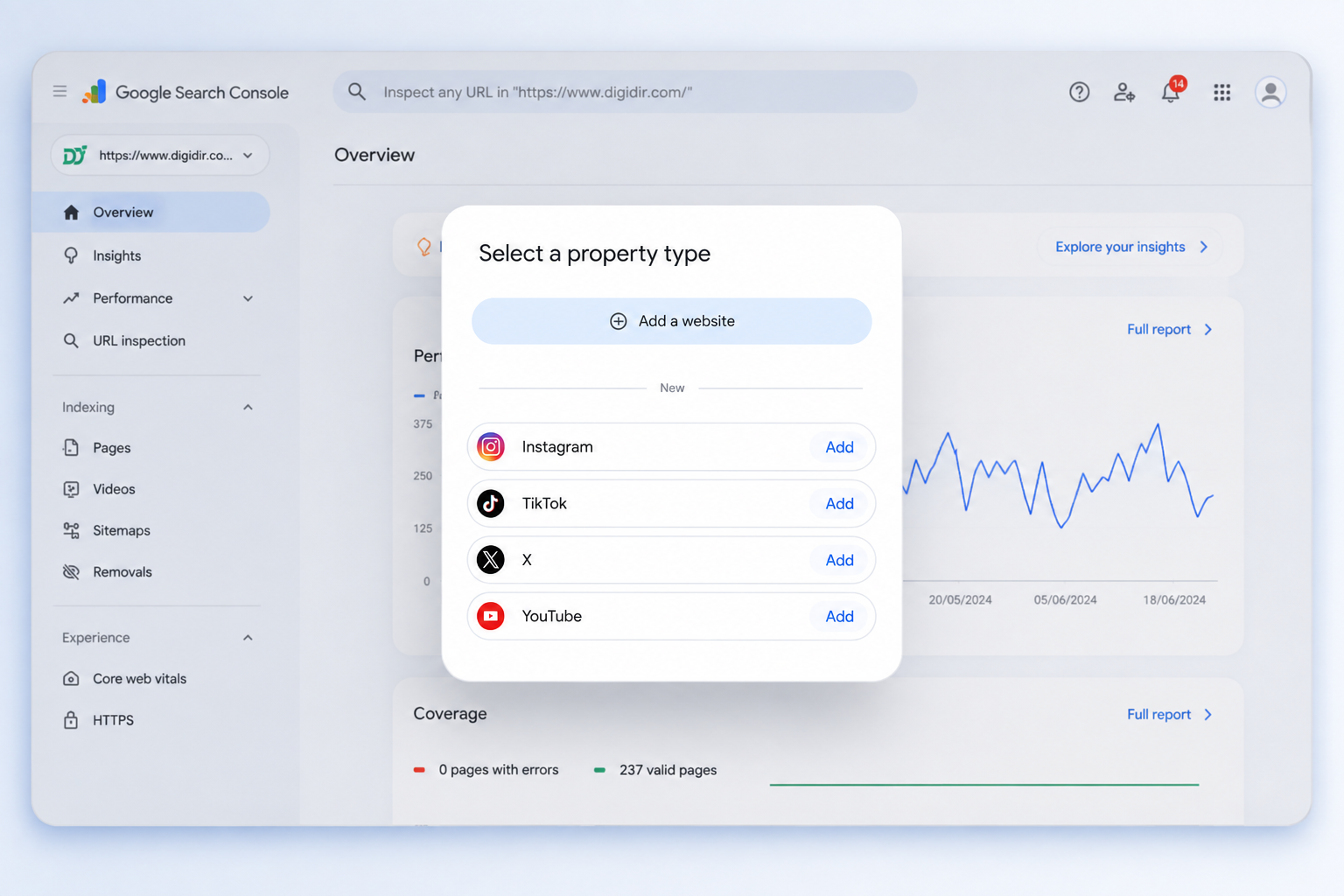
Google calls this new feature Platform Properties. It sits alongside your regular website property inside Search Console, but instead of tracking a domain, it tracks a social or video account. The announcement went out on Google’s Search Central Blog on July 7, 2026, and the rollout has been gradual, so not every account saw the option right away.
At launch, four platforms are supported:
TikTok
Facebook and LinkedIn are not part of this rollout yet, and Google hasn’t confirmed when or if they will be added. If you don’t see the “Add Property” option for your social account today, it likely just hasn’t reached your account, not a bug on your end.
It’s worth noting this is genuinely different from an older, more limited experiment Google tested in December 2025, where social channels were automatically detected and surfaced inside a site’s Insights report. That version was automatic, required a website, and gave no real control. Platform Properties work the opposite way: you actively create and verify the property yourself, and it functions as its own standalone dashboard, independent of whether you even own a website.
How to Link Your Social Profile to Search Console
Setting it up is fairly simple:
- Sign in to Google Search Console with the Google account tied to your social profile.
- Click the property selector in the top-left corner and choose Add Property.
- Instead of entering a URL, select the platform type — Instagram, TikTok, X, or YouTube.
- Complete the verification steps, which usually involve confirming ownership through your connected app or account settings.
- Wait roughly 24 to 48 hours for your first batch of performance data to show up.
The whole process takes under ten minutes per account.
Why This Is a Big Deal
For years, Search Console only worked if you owned and verified a website. That excluded a massive group of people: creators, influencers, and small businesses who live entirely on social platforms but have no site of their own. This update removes that barrier. You no longer need a website to get a Search Console dashboard.
That matters because search results already include social content constantly. When someone searches for a brand name, Google often shows that brand’s Instagram or YouTube presence right alongside the website, sometimes inside the Knowledge Panel. Public posts from platforms that allow indexing can even appear as standalone results for specific searches. Until now, none of that visibility was measurable. It was, as one report put it, a complete black box.
The Benefits for SEO and Content Strategy
- Real search data instead of vanity metrics. In-app analytics tell you about likes, views, and shares. They tell you nothing about whether your content shows up when someone searches on Google. Platform Properties fills that gap with actual clicks, impressions, and top queries.
- Cross-platform comparison. You can now compare how your website content and your social content perform for the very same search queries, all inside one dashboard.
- Accessibility for creators without a website. Anyone running a content-first business on Instagram or YouTube can finally access proper search performance data, something previously reserved for website owners only.
- Better brand consistency signals. Linking your official profiles to Search Console reinforces the connection between your website, Google Business Profile, and social accounts. While Google hasn’t confirmed a direct ranking boost, consistent brand signals across platforms generally help Google understand and trust a business.
- Smarter content decisions. Once you know which platform and which specific posts are actually pulling in search traffic, you can double down on the content types that work instead of guessing.
A Few Honest Limitations
This feature only reports on Google Search and Discover. It says nothing about whether AI chat tools or AI-powered search engines are surfacing your content elsewhere. It also currently excludes Facebook and LinkedIn, so businesses relying heavily on those platforms will need to wait.
Final Thoughts
This update closes a long-standing blind spot in digital marketing. Social content has influenced Google Search results for years, but nobody outside Google could actually measure it properly. Platform Properties changes that, and it does it in a way that’s genuinely accessible, even if you’ve never touched a website in your life.
If you manage social accounts for a brand, this is worth setting up now. The sooner you connect your profiles, the sooner you start building a real performance history instead of starting from zero later.
FAQs
Q1. What is Platform Properties in Google Search Console?
It’s a new property type that lets you connect a social or video account—Instagram, TikTok, X, or YouTube—directly to Search Console, so you can see how that content performs in Google Search and Discover, without needing a website.
Q2. Which platforms are supported right now?
Only four at launch: Instagram, TikTok, X (formerly Twitter), and YouTube. Facebook and LinkedIn aren’t included yet, and Google hasn’t said if or when they’ll be added.
Q3. Do I need to own a website to use this feature?
No. That’s the main shift here. Platform Properties works as its own standalone dashboard, so creators and businesses who operate purely on social platforms can now get search performance data for the first time.
Q4. How is this different from the social insights Google tested in December 2025?
That earlier version auto-detected social channels and surfaced them inside a website’s Insights report—it required a site and gave you no control. Platform Properties is the opposite: you manually add and verify the property yourself, and it works independently of any website.
Q5. How do I set up a Platform Property?
Sign in to Search Console, click “Add Property,” choose your platform type instead of entering a URL, complete the verification steps through your connected account, and wait about 24–48 hours for data to appear. The whole setup takes under 10 minutes.
Q6. What are the limitations of this feature?
It only reports data from Google Search and Discover—it won’t tell you anything about visibility in AI chat tools or AI-powered search engines. It also doesn’t currently cover Facebook or LinkedIn, and the rollout has been gradual, so not everyone has access yet.